Protocols sequential execution
MindRun versions 2026.5 and later allow sequential execution of protocols.
Principle of sequential protocol execution
For sequential protocol execution to work, the MindRun web services must first be deployed. The launch command for the next protocol is sent by the current protocol as a network execution command through the web service deployed by MindRun.
Sequential execution
Sequential protocol execution does not work in MindDev: it is a MindRun-only feature.
Sequential execution uses the MindRun database to find protocol to run.
To perform a sequential execution, the protocol must be specifically prepared. It must contain specific nodes that allow it to launch the next protocol.
To do so, MindDev provides a special entity, "RunProtocolOnFinishedEntity" (only under Protocol's entities), which has several specific parameters:
- The address of the MindRun server (default: "localhost")
- The protocol identification number
- Automatic activation (true by default)
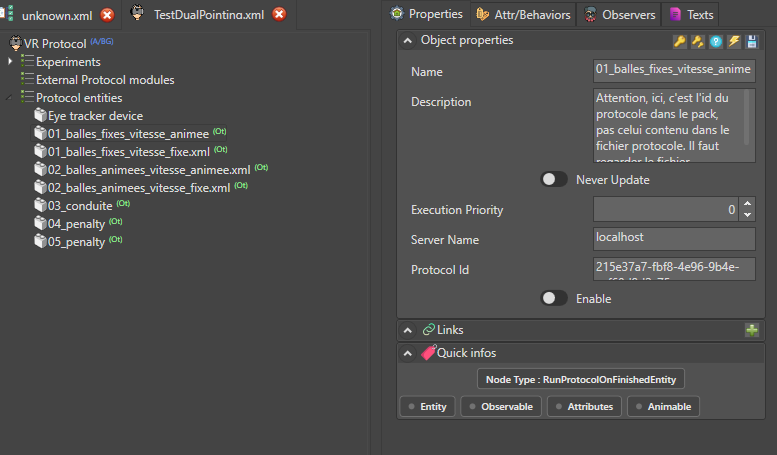
The protocol identification number can be found in the pack file that contains the protocol to execute. In the pack's XML file (RegisteredProtocols folder), the identifier is found in the Id attribute of the ProtocolReference tag.
<ProtocolReference ProtocolId="907d66fc-790c-44fb-afd6-1130037c7526" DeviceCode="VRHeadset" Id="363db19b-beaa-4228-9e2c-611090cb8dba" ProtocolFile="calibrationmailletpieton.xml" FilterProtocolFile="calibrationmailletpieton.xml" HelpUrl="" ProtocolHash="" FilterProtocolHash="" BatteryName="Calibration" Name="Calibration Maillet Piéton" BindingName="" Description="Protocole de calibration du maillet piéton via HTC Tracker.

L'ajustement Hauteur permet d'ajuster finement la position du 
maillet sur l'axe vertical. 

Par défaut : 0.00
Valeurs acceptable : [-0.05;0.05]. 
Au delà de cet intervalle, revoir la calibration de SteamVR." Type="HumanVirtualMaze.Model.Lite.ProtocolReference" NeverUpdate="False" ObjectExecutionOrder="0">
<DynamicProperties ProtocolId="907d66fc-790c-44fb-afd6-1130037c7526" UseReferenceFile="False" ReferenceFile="" Id="2b293fe2-848f-4962-812e-75e20567dc98" Name="DynamicProperties" BindingName="" Description="" Type="HumanVirtualMaze.Model.Lite.DynamicPropertyList" NeverUpdate="False" ObjectExecutionOrder="0">
<DynamicProperty PropertyName="PositionZ" ObjectName="AxisReference" Value="0" DisplayedName="Ajustement Hauteur (m)" Id="45ffb064-70e4-41c3-bbe9-c2513045a666" Name="Dynamic Property" BindingName="" Description="Ajustement de hauteur du maillet par rapport au maillet réel

Par défaut : 0.00
Valeurs acceptable : [-0.05;0.05]. " Type="HumanVirtualMaze.Model.Lite.DynamicPropertyNode" NeverUpdate="False" ObjectExecutionOrder="0" />
</DynamicProperties>
</ProtocolReference>
Protocol identification number
The protocol identification number must be the number of the protocol within the pack that contains it!
Conditional activation
It is entirely possible to design a branching point in the sequential execution, so that the next protocol is executed only under certain conditions. In this case, set the "Enable" option to false and set the dynamic property "RuntimeEnableRunProtocol" to true during the execution of the current protocol.
The RuntimeEnableRunProtocol observation target makes it possible to alter the sequential execution while the session is running, for example by using simple 2D buttons.