Lua Console
The MindDev Lua Console is used to create procedures and tools for modifying protocols open in MindDev. This console can be used to extend productivity features by creating Lua scripts that can have very complex and precise behaviours.
Lua Console
The Lua console is a code interpreter. Not all functions available in MindDev are listed on this page, and each new version of MindDev introduces additional commands.
Lua Console
The Lua console allows you to execute complex, custom operations.
Obtaining console commands
A change in the GUI causes the corresponding command to be written to the LUA console window. This is very useful when you want to program your LUA script without knowing all the properties of the objects.
Lua Function and Array Indexing
The functions come from C# code and use zero-based list/array indexing (the first element is at index 0). However, accessors implemented via Lua using [] use one-based indexing. Therefore, the function GetChild(0) is valid, whereas Children[0] is not valid.
Basic Commands
Below is a list of basic commands. This list is not exhaustive—additional commands are also available.
| Command | Example | Description |
|---|---|---|
| Commands | Commands() |
Displays all available basic commands |
| Commands | Commands("Tools") |
Displays all available commands for the specified toolset passed as a parameter. |
Print(Protocol.MaxTime) |
Displays the value of the given parameter | |
| Get | Get(Protocol.Children[0]) |
Returns the object passed as a parameter |
| Create | Create("TimerSuccess") |
Creates an object of the specified type and returns it |
| CreateNode | CreateNode("TimerSuccess") |
Same as Create — creates and returns the specified object |
| Delete | Delete(Selection) |
Deletes the given object, if possible |
| DeleteNode | DeleteNode(Selection) |
Same as Delete — deletes the given object, if possible |
| Children | Children(Selection) |
Displays the list of children of the specified object |
| AddNode | AddNode(Selection, child) |
Adds the second parameter as a child of the first |
| Properties | Properties(Protocol) |
Displays the available properties of the specified object |
| Methods | Methods(Protocol) |
Displays the available functions of the specified object |
Displaying all Lua commands
MindDev-specific commands begin with a capital letter, while basic Lua commands begin with lower case letters.
Print vs. print
The MindDev-specific Print command allows writing to the console, this is an alias if the print function.
Accessing Objects
Access to objects is done easily using a few keywords:
| Keyword | Description |
|---|---|
Protocol |
Gives access to the protocol currently being designed |
Selection |
Gives access to the currently selected node |
Trial |
Gives access to the parent trial node of the selected node (if available) |
Experiment |
Gives access to the parent experiment node of the selected node (if available) |
Nodes["object_name"] |
Provides access to the object by its name. |
Accessing an object by name in the LUA console
Accessing an object can be problematic when multiple objects share the same name. In such cases, it is better to refer to the object using its hierarchical path.
A set of access commands allows you to navigate through the protocol tree:
| Call | Example | Description |
|---|---|---|
| GetChildByName | Protocol.GetChildByName("Experiments") |
Returns a child object by name |
| GetChild | Selection.GetChild(0) |
Returns a child object by index in the children list |
| Parent | Selection.Parent |
Returns the parent object |
Accessing the Software
The Software command provides access to the software interface.
Software Commands
The command Methods(Software) returns all available software commands.
Here are some important software commands:
| Command | Description |
|---|---|
Software.CreateProtocol() |
Creates a new protocol |
Software.CreateVRProtocol() |
Creates a new VR protocol |
Software.GetCurrentProtocol() |
Gets the currently active protocol |
Software.LoadProtocolByFile("c:\...\myfile.xml") |
Loads the protocol from the specified file |
Software.SaveSelectedProtocolToFile("c:\..\myfile.xml") |
Saves the selected protocol to the specified file |
Software.SaveSelectedProtocol() |
Saves the selected protocol |
Software.GetOpenedProtocolCount() |
Gets the number of opened protocols |
Software.GetOpenedProtocolFiles() |
Gets the list of opened protocols by their file paths |
Software.GetOpenedProtocols() |
Gets a list of opened protocols |
Software.GetProtocolByIndex(1) |
Gets the opened protocol at the given index |
Software.ActiveProtocolByIndex(2) |
Selects the protocol at the given index |
Software.GetXmlFilesInFolder("c:\...\mydirectory") |
Gets the list of XML files in the specified folder and all its subfolders |
Software.GetFilesInFolder("c:\...\mydirectory") |
Gets the list of files in the specified folder and all its subfolders |
Software.Help() |
Opens the online help |
Software.Undo() |
Undoes the last action |
Software.Redo() |
Redoes the last undone action |
Loading scripts when the software is launched
It is possible to pre-load a set of scripts when the software is launched. To do this, place your Lua files (.lua file extension) in the Scripts/Startup/ directory of the data folder.
Loading scripts
Loading scripts at startup does not allow commands such as Selection or Protocol to be executed directly. It is mainly used to declare functions which may contain these keywords, but which will be called later, in a given context.
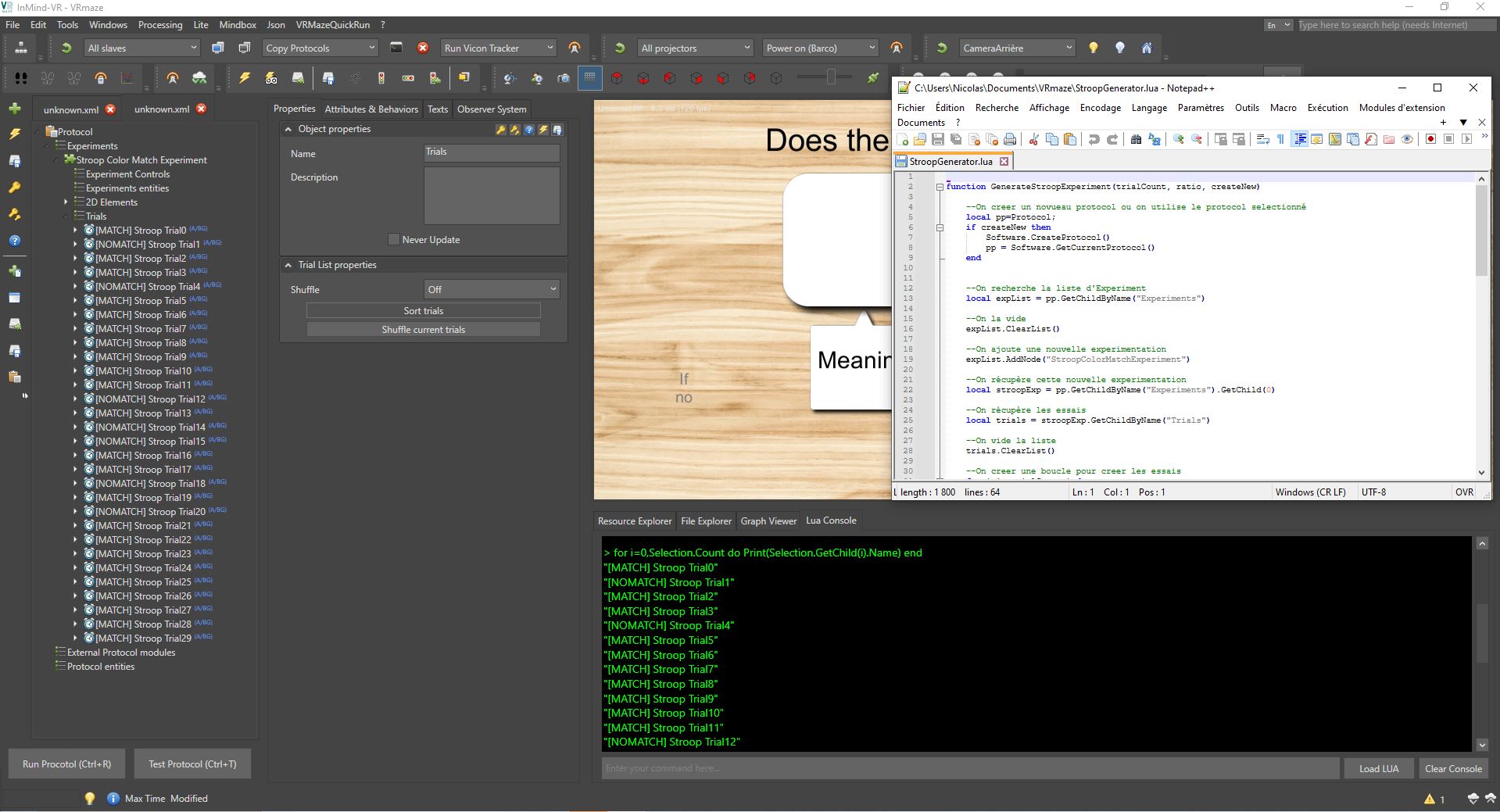
Lua Script (Example)
It is entirely possible to create Lua scripts to perform operations not covered by the software’s general features.
The console includes a button to load a Lua script file. When loaded, the script is evaluated.
The console has a button for loading a Lua script. Loading will evaluate the file.
Dynamic Lua script loading
The interface has a button for loading a filer with the .lua extension. This can be used to quickly test an external script.
Lua Script
You can define specific Lua functions so that you can reuse them later.
This script can be used as a preloader when the software is launched.
function GenerateStroopExperiment(trialCount, ratio, createNew)

    --On creer un nouveau protocol ou on utilise le protocol selectionné
    local pp=Protocol;
    if createNew then
        Software.CreateProtocol()
        pp = Software.GetCurrentProtocol()
    end


    --On recherche la liste d'Experiment
    local expList = pp.GetChildByName("Experiments")

    --On la vide
    expList.ClearList()

    --On ajoute une nouvelle experimentation
    expList.AddNode("StroopColorMatchExperiment")

    --On récupère cette nouvelle experimentation
    local stroopExp = pp.GetChildByName("Experiments").GetChild(0)

    --On récupère les essais
    local trials = stroopExp.GetChildByName("Trials")

    --On vide la liste
    trials.ClearList()

    --On creer une boucle pour creer les essais
    for i=0, trialCount-1 do

        --Ajout d'un essai
        trials.AddNode("StroopColorMatchTrial")
        local current = trials.GetChild(i)

        --Renommage
        current.Name="Stroop Trial" .. i

        --Ajout d'une description
        current.Description = "Lua Generated"

        --Configuration de l'essai
        current.LeftWordIndex = math.random(0,3);
        current.RightWordIndex = math.random(0,3);

        --Affectation du color Match/NoMatch
        if(math.random()>ratio) then
            current.WaitedAnswerButtonName="MatchAnswer"
            current.Name="[MATCH] Stroop Trial" .. i
            current.GetChildByName("Custom Attributes").GetChild(0).Value = 1
        else
            current.WaitedAnswerButtonName="NoMatchAnswer"
            current.Name="[NOMATCH] Stroop Trial" .. i
            current.GetChildByName("Custom Attributes").GetChild(0).Value = 0
        end
    end
end

--Affichage d'une aide d'usage
Print("Usage : GenerateStroopExperiment(TrialCount, Ratio, createNewProtocol)")
Print("Example : GenerateStroopExperiment(20, 0.5, true)")