Render effects and HDR
Using HDR rendering and camera effects
By default, HDR rendering is disabled in MindDev. It is enabled via a custom attribute on the Subject entity (or VRSubject, depending on the protocol type).
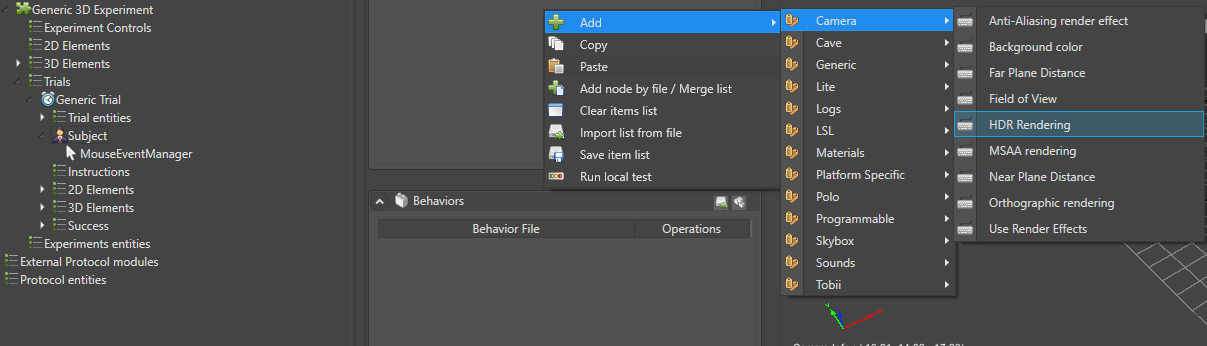
Rendering effects
There are two types of rendering effects:
- Camera effects
- Post-processing effects
Camera effects
Camera effects are enabled in the same way as HDR rendering, via custom attributes.
The list of camera effects is as follows:
- Anti-aliasing (2x nodes)
- Background color
- Maximum display distance
- Minimum display distance
- Camera aperture
- Orthographic rendering
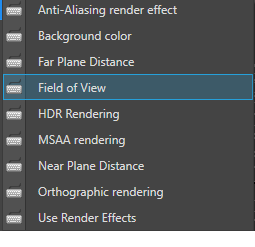
It is also possible to disable all post-processing effects with the Use Render Effects custom attribute, which must be set to false.
Post-processing effects
Post-processing effects are used differently. MindDev provides a dedicated Render Effects container entity, which holds a list of effects whose settings can be complex.
The list of available post-processing effects is as follows:
- Bloom
- Channel Mixer
- Chromatic Aberration
- Color Adjustment
- Depth of Field
- Film Grain
- Lens Distortion
- Motion Blur
- Panini Projection
- Tone mapping
- Vignette
- White Balance
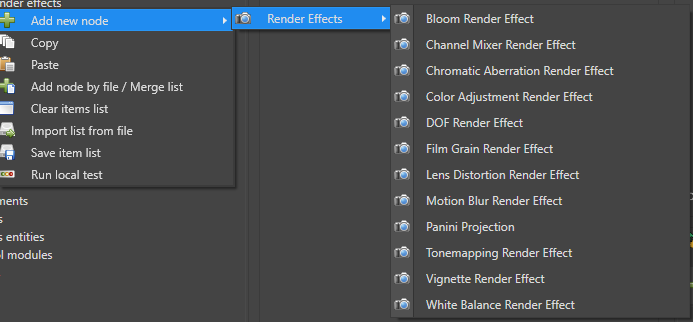
Post-processing effects
Some post-processing effects work better when HDR rendering is enabled.
Fog
You can control the fog density as well as its color. The Subject node has an option to enable fog and to set its density and color.
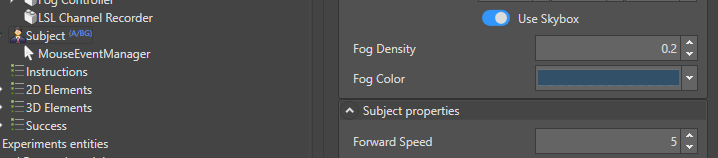
Changing the fog at runtime
The fog density in a scene can be adjusted dynamically at runtime. The special FogController entity has a dynamic property, RuntimeFogDensity, which can be manipulated during execution. It can, for example, be linked to a mathematical formula.